Tracking membership or subscription data in a CRM is one of the most consistently mishandled setups I see across membership businesses. When it’s done poorly, the result is extra manual work, inaccurate records, and – most critically – lost revenue from subscription failures that go completely unnoticed until the damage is done.
In 12+ years working with membership and subscription businesses at Streamline for Success, I’ve helped over many businesses (solopreneurs to million-dollar businesses) fix this exact problem. In this article, I’ll walk you through how we recommend capturing membership data: what to collect, how to structure it in your CRM, and why automating the maintenance of that data is non-negotiable.
The Three Areas of Membership Data
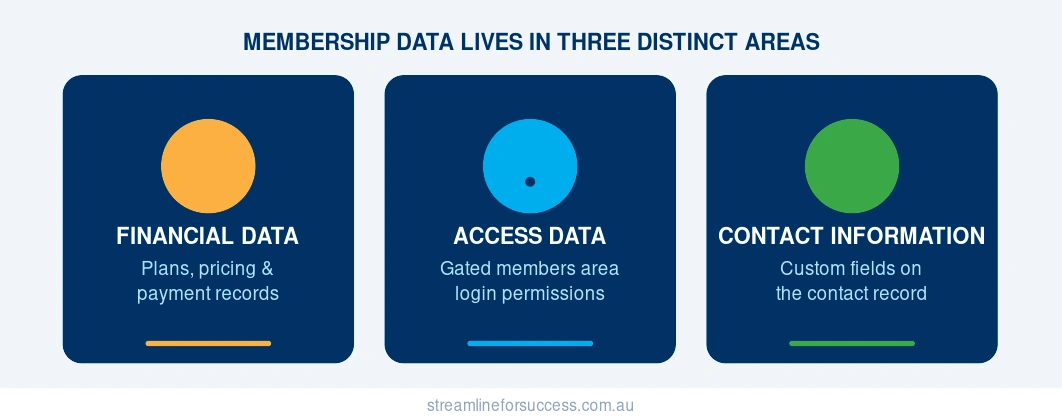
There are typically three distinct areas where membership and subscription information lives in any CRM setup:
- Financial Data
- Access Data
- Contact Information
Each plays a different role – and understanding where each lives is the first step to managing your membership data properly.
Membership Financial Data
Recurring subscription payment data is usually captured in the payments section of your CRM or within your merchant provider. While this is essential for your financial records, it’s rarely in a format that lets you easily search, filter, or analyse your member base at a glance.
This is why most membership businesses look to tags or custom fields on the contact record to surface this information where it’s actually usable. And that choice – tags versus custom fields – matters far more than most people realise.
Membership Access Data
Your members or subscribers typically have access to a gated members area – where they will use their own username and password to access recorded video training, audio, PDFs, guides and more.
Access to that gated area is usually controlled by tags (if you’re using a third-party integration with your CRM) or managed within a dedicated membership module (if your CRM supports an all-in-one solution). It’s important to know exactly where your system stores and manages this – because if you don’t, inconsistencies between access and payment status slip through undetected.
Membership Contact Information
Access data is binary – someone either has access or they don’t. Financial data is comprehensive but buried in a separate part of your platform. Neither gives you a clean, at-a-glance view of your active subscriber base or the details you actually need day-to-day.
That’s why I recommend storing core membership and subscription information directly on the contact record in your CRM. This is also where one of the most important structural decisions in your CRM setup comes in.
Membership Tags vs Custom Fields: Why the Difference Matters
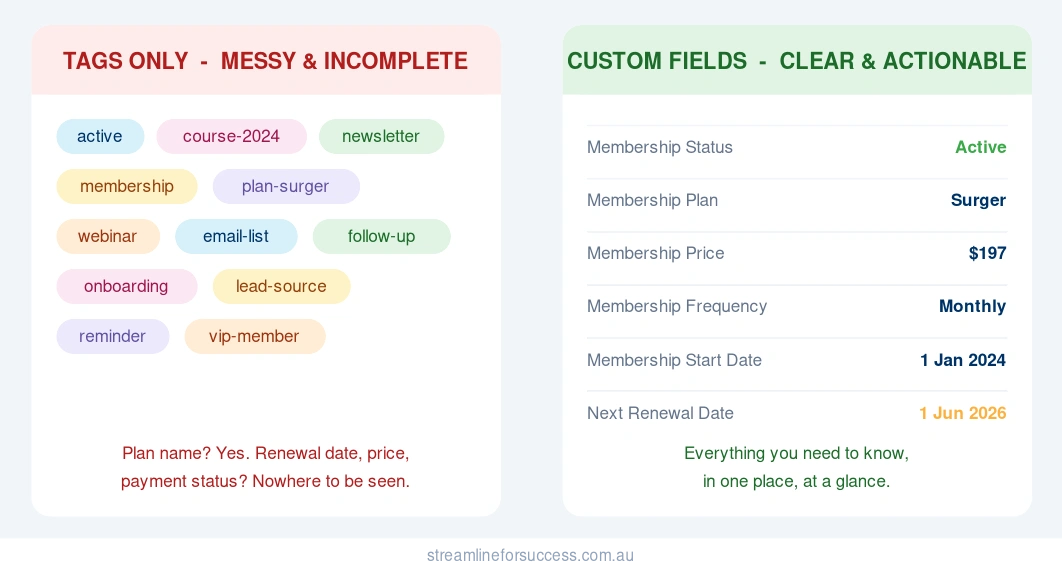
After working with membership businesses across 12 years, I’ve seen the same pattern repeatedly: businesses track their active members using tags – usually because their access permissions are tag-driven. It seems logical at first. But it creates serious problems down the line.
I had a client who came to us wanting to analyse their membership retention – how long members had been active, whether anyone had changed plans, who their most loyal members were. Because they had only ever tracked this data as tags, they had none of that information. They ended up spending hours manually digging through their financial records just to piece together a basic picture of their own membership. That’s not just frustrating – it’s a sign that the business is flying blind.
Tags have their place – they trigger automations, sort contacts into buckets, and in many systems, they’re what grants or removes access to the members area. That’s all valid. But asking tags to also carry your membership intelligence – the plan details, the dates, the pricing, the history – is where the problems start.
The Disadvantages of Using Tags for Membership Tracking
Here are the three biggest problems with relying on tags to track active members:
- Tags are hard to read at a glance. A membership tag is buried among every other tag on a contact record – onboarding tags, campaign tags, interest tags. There’s no clean visual cue telling you whether someone is an active, paid-up member or a lapsed one without reading through the full list.
- Tags don’t tell the full story. A tag doesn’t show you what plan someone is on, when they joined, when their next renewal is due, or whether their account is current and paid. It tells you one thing: that someone has been tagged. That’s it.
- Tags can’t be merged into communications. If you want to send a renewal reminder that references someone’s plan name and next billing date, you can’t pull that from a tag. It has to live in a custom field – which means if it’s only in a tag, you can’t personalise that message at all.
The Advantages of Custom Fields for Membership Data
Custom fields solve all three of those problems – and open up capabilities that tags simply can’t offer:
- Full picture. You capture exactly the information your business needs – plan name, price, frequency, start date, renewal date, payment method, and more – all in one structured location.
- Easy visibility. Everything you need to know about a member is in one place on their contact record. No hunting through tags. No switching between the CRM and your payment platform just to answer a basic question.
- Merge capability. Plan name, renewal date, membership price – all of this can be pulled directly into emails, SMS messages, and tasks. This alone saves significant time every single month and enables the kind of personalised communication that improves retention.
- Reporting and insights. With data in custom fields, you can filter your member base, run meaningful reports, and identify patterns – like which plan has the highest churn, or which payment method causes the most failures. This is the foundation of a membership business that can actually make data-informed decisions.
The Recommended CRM Custom Fields for Membership and Subscription Data
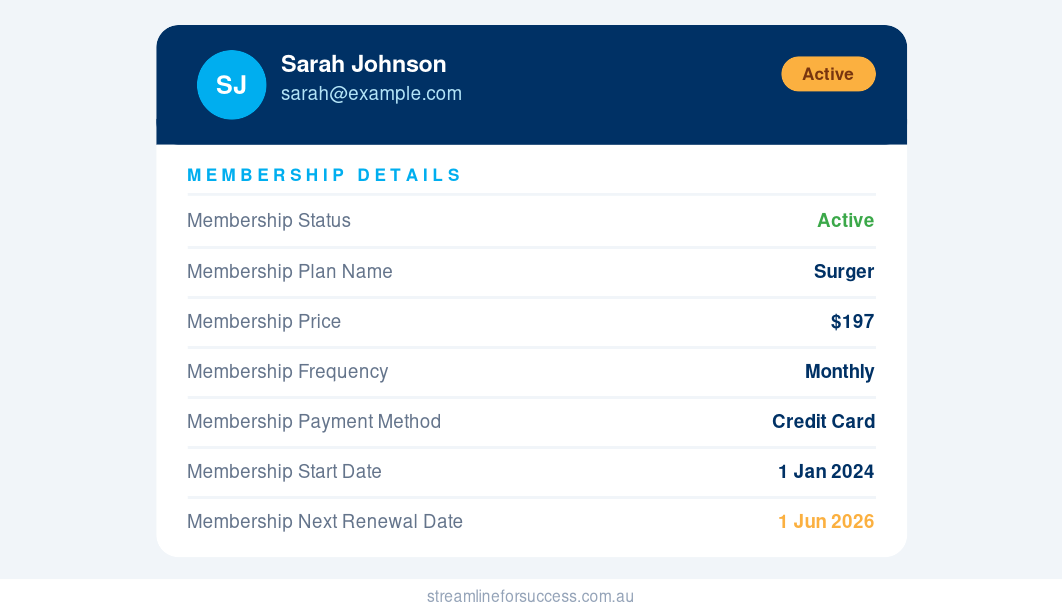
Below are the core custom fields I recommend for every membership or subscription business. These should live on the contact record in your CRM and be maintained through automation wherever possible.
| Custom Field Title | Description | Field Type | Options / Example |
|---|---|---|---|
| Membership Status | Quickly identifies who is active or not | Dropdown | Active / Past |
| Membership Plan Name | The specific plan or offer the member is on | Dropdown | Starter / Surger / Scaler |
| Membership Price | The price point for this member, centralised so you don’t need to check the subscription manually | Whole Number | $197 |
| Membership Frequency | How often the payment cycle runs | Dropdown | Weekly / Monthly / Quarterly / Annually |
| Membership Payment Method | How the member is paying | Dropdown | Credit Card / EFT |
| Membership Start Date | The original date the member joined | Date | 1-Jan-2024 |
| Membership Next Renewal Date | The date the next payment is due | Date | 1-Jan-2025 |
| Membership End Date | The date membership ended (for lapsed members only) | Date | 23-Dec-2025 |
| Membership Cancellation Reason | Why they cancelled | Dropdown | Too Expensive / Not Using It / No Longer Need It / Other |
| Membership Cancellation Other | Free-text field for any other reason | Text Area | “We are going on a 6-month trip and won’t need this for now.” |
Additional Fields for Multi-Level Membership Plans
If your business offers different tiers or plan levels, add this field to track movement between plans accurately:
| Custom Field Title | Description | Field Type | Example |
|---|---|---|---|
| Membership Current Plan Start Date | Tracks when the member started their current plan, important for members who have upgraded or downgraded. Always set this on signup, and update it whenever someone changes plans. | Date | 1-Mar-2025 |
Additional Fields for Payment Failure Tracking
Because payment failures happen – and because you’ll want to know which renewal was the last successful one before a failure occurred – these two fields are useful for businesses managing any volume of recurring payments:
| Custom Field Title | Description | Field Type | Example |
|---|---|---|---|
| Membership Last Renewal Date | The date of the most recent successful renewal | Date | 1-Apr-2025 |
| Membership Last Payment Date | The date the most recent successful payment was processed | Date | Today’s date |
Maintaining Your Membership Custom Fields
Setting up these fields is only half the job. Data that isn’t maintained becomes noise – and noise is worse than no data, because it creates false confidence.
Here is how I recommend handling each key event in the membership lifecycle:
- Onboarding: Set all relevant fields as soon as someone signs up. If a previously cancelled member rejoins, make sure you clear out the old cancellation date, reason, and any other cancellation notes before setting the new membership data.
- Cancellation: Before clearing a member’s fields, copy all current membership data into a note on their contact record. Then clear the active membership fields and populate only the cancellation-specific ones. This preserves the history without leaving active-looking data on a lapsed account.
- Plan upgrades, downgrades, or changes: Whether someone is upgrading to a higher tier, dropping to a lower one, changing their billing frequency, or switching payment method – each of these should trigger an update to the relevant custom fields. For example, an upgrade should update Membership Plan Name, Membership Price, and Membership Current Plan Start Date.
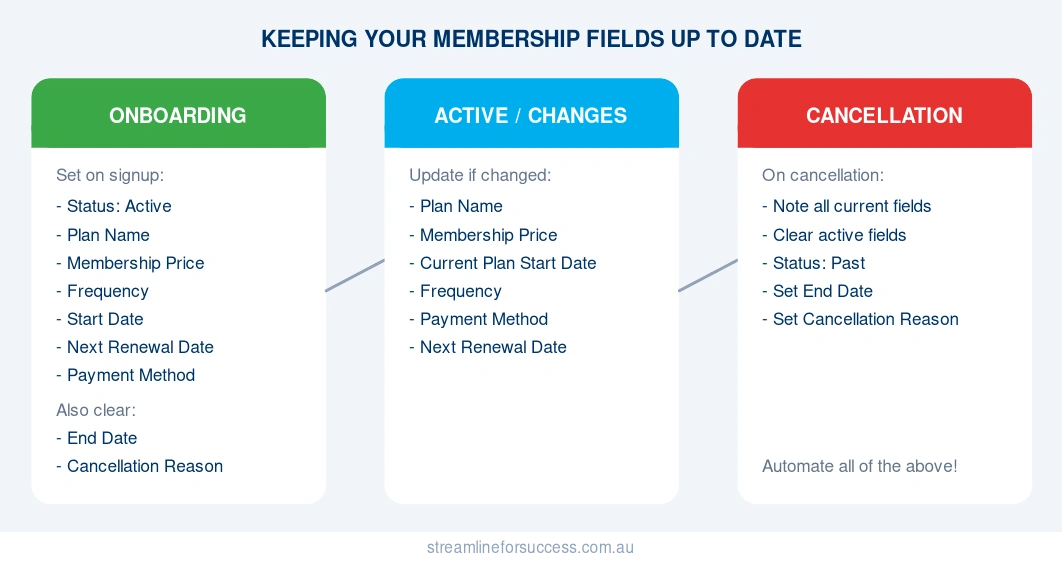
The most reliable way to ensure all of this actually happens consistently is to build it into your CRM automations. Manual processes break down when you’re busy. Automated field updates don’t.
Auditing Your Membership Data
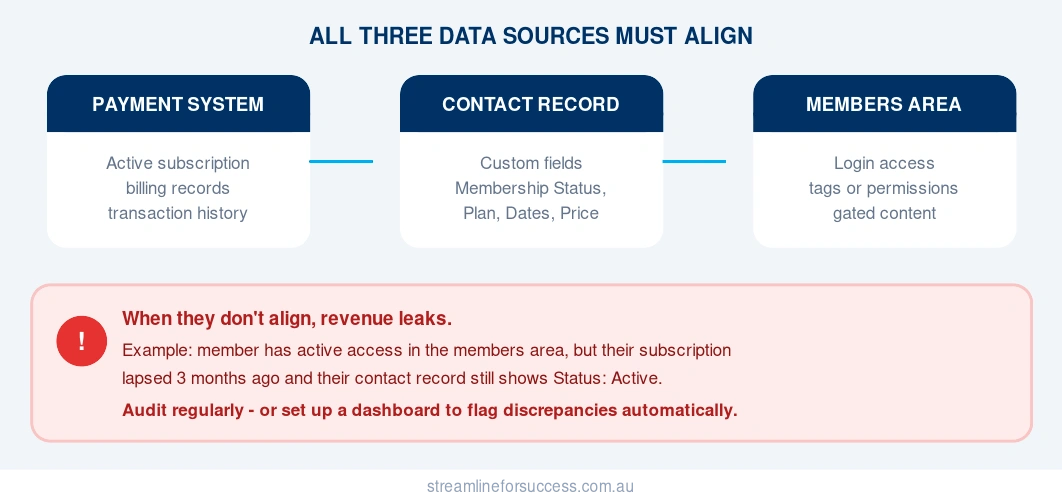
Your membership data lives in three places:
- Active subscription records in your payment or financial system
- Access permissions – either as tags or within your membership/course area
- Custom fields on the contact record in your CRM
These three sources should always align.
When they don’t, revenue leaks – and it’s often invisible until you go looking.
Here’s a real example: a client came to us thinking they had 50 paying subscribers. After a cross-system audit, we found that 75 people had active access to their members area. That’s 25 members receiving full access without a current, active subscription. Real revenue. Lost every single month. Completely invisible without an audit.
Don’t let that be you!
There are a lot of combinations to check – someone could have access but no active membership status, or an active status with no access, or a payment on record with neither. Trying to catch all of that manually is how things get missed.
The better approach is to set up a dashboard in your CRM that automatically surfaces discrepancies as they happen. We’ve done this for clients so that combinations like “has access but Membership Status is not Active” get flagged in real time, without anyone having to go looking. Pair that with assigning someone on your team the specific responsibility of reviewing and resolving those flags regularly, and you’ve got a system that protects your revenue without relying on memory or manual spot checks.
Whether you go the dashboard route or a scheduled manual audit – monthly or quarterly depending on the size of your membership – the goal is the same: your payment records, access permissions, and contact record data should always align.
Building a Membership Data System That Works
When your membership data is structured correctly – with the right custom fields, maintained through automation, and audited regularly – you move from reactive to proactive. You can see your member base clearly, communicate with them personally, and catch problems before they cost you money.
This framework has helped our clients at Streamline for Success manage everything from small, close-knit communities to high-revenue membership programs – giving them the visibility and control they need to grow with confidence.
If you’d like help setting this up in your CRM, book a call with us.
Mandy Brasser is the founder of Streamline for Success, a CRM strategy and automation consultancy helping membership and subscription businesses build systems that grow with them.